What’s New in payPod: Better Dashboards, Faster Bookkeeping and Smarter Client Management
2026-08-21
We’ve released a collection of new features designed to make your day-to-day financial management faster and more insightful. Here’s a quick look at what’s new in payPod since 18 August.
A refreshed business dashboard
The main dashboard now provides a clearer snapshot of your business performance.
The new Month at a Glance summary shows totals for quotes, invoices, income and expenses, while the interactive trend chart lets you compare these figures over a custom date range. Results can be grouped daily, weekly or monthly.
New client & supplier overview dashboards
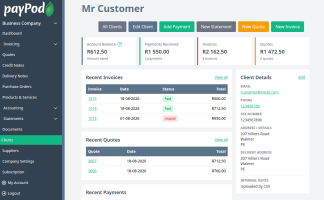
Every client and supplier now has a dedicated overview page, separate from the edit form.
The overview brings together:
- Account balance
- Payments received
- Invoice and quote totals
- Recent invoices, quotes and payments
- Invoice payment statuses
- Contact, tax, address and internal details
The client account balance is calculated from invoices, payments and credit notes, starting from zero on your configured Client Statement Opening Date.
You can also create a new statement, quote or invoice directly from the overview, with the client selected automatically.
Client archiving
You can now archive clients you no longer actively work with without losing their records.
Archived clients are removed from selection lists when creating new invoices, quotes and other documents, while their historical documents and account activity remain available. Clients can be archived or restored individually or in bulk.
CSV client imports
Adding or updating a large client list is now much quicker.
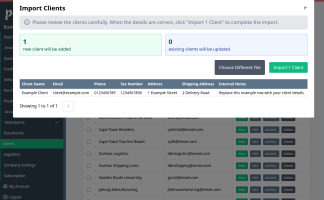
Download the sample CSV template, add your client information and upload it for review. payPod validates the file and shows how many clients will be added or updated before anything is imported.
The importer supports contact details, tax numbers, addresses, delivery addresses and internal notes.
Split transactions
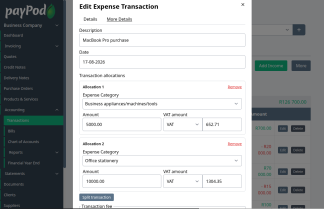
A single income or expense transaction can now be divided between multiple accounting categories.
Each allocation can have its own amount and VAT treatment, while transaction fees are still captured once for the overall transaction. Split allocations are supported when recording income, expenses and reconciling bank statement entries.
Powerful transaction search
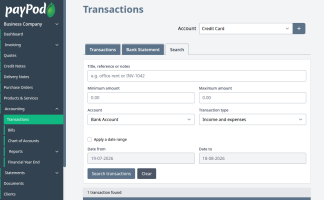
The Transactions page now includes a dedicated search area for finding entries across all accounts.
Search by:
- Transaction title, reference or notes
- Minimum and maximum amount
- Account
- Income, expense or journal transaction
- Optional date range
Search results include the relevant accounts and amounts, with direct access to edit or delete an entry.
Cash flow statements
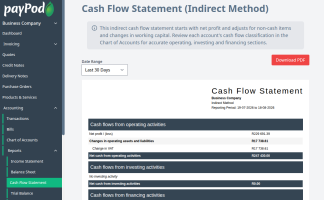
Premium users can now generate an indirect cash flow statement covering operating, investing and financing activities.
Accounts can be assigned an appropriate cash flow classification from the Chart of Accounts, and completed reports can be downloaded as PDFs.
Trial balances
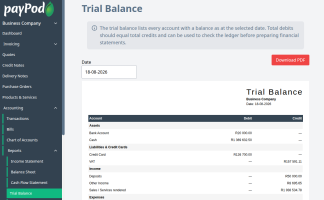
The new Trial Balance report provides the debit or credit balance of every account on a selected date.
It includes total debits and credits, highlights any reconciliation difference and can be downloaded as a PDF.
These improvements are available in payPod now. Sign in to explore the refreshed dashboard and new client and accounting tools.